Best RSVP websites for guest photos: pick and set up
SnapPix TeamPublished 2 Aug 202626 min read

If you want one tool that handles RSVPs and collects guest photos and videos without asking anyone to download an app, SnapPix is the clearest pick. Guests scan a QR code, upload straight from their phone browser, and you get a password-protected gallery with AI-generated smart albums waiting for you after the event.
Why SnapPix works for photo-first RSVP hosting:
SnapPix has collected thousands of guest photos across weddings, corporate events, and private celebrations. If you want to skip straight to setup, the step-by-step checklist is in section four below.
The core problem most RSVP tools ignore is what happens after the guest confirms attendance. You still need a way to collect their photos. SnapPix solves both in a single workflow.

| Feature | What it does for you |
|---|---|
| QR code upload (no app) | Guests scan and upload in seconds from any phone browser |
| RSVP form builder | Custom fields: meal choices, dietary needs, plus-ones, media permissions |
| Guest list management | Track responses, export data, manage plus-ones |
| Password-protected gallery | Only invited guests can view or upload |
| AI smart albums | Automatically groups photos by face, moment, or theme |
| Photo challenges | Prompts guests to capture specific shots, building participation |
| High-res downloads | Full-quality files available to the host at any time |
| Three-month hosting window | Guests can still add photos weeks after the event |
Browser-based, no-app workflows consistently raise guest participation compared with mandatory app downloads, and SnapPix is built entirely around that principle.
Use cases where the integrated workflow pays off:
SnapPix has collected over 4,200 guest photos across events of all sizes, with the three-month hosting window giving hosts a complete gallery long after the day itself.
Pro Tip: Enable photo challenges before your event. Prompts like “grab a photo with someone you haven’t seen in a year” consistently increase guest uploads and give your album real variety.
Not every RSVP tool is built to handle photos and videos. Before you commit, check these six dimensions.
| Approach | Typical pricing model | Hosting limit | Photo collection |
|---|---|---|---|
| Lightweight RSVP forms (e.g. RSVP.link) | Free up to 15 responses; one-time $15 fee | No media hosting | None built in |
| Photo-first RSVP platform (SnapPix) | One-off per event from £14.99 | Three months post-event | QR, no-app, AI albums |
| Enterprise event management | Subscription, scales with guest count | Varies by contract | Rarely included |
“Matching the tool to event scale and team workflows matters more than feature counts.” This is the single most useful frame when evaluating top RSVP platforms — a tool with 50 features you will never use is not better than one that does three things perfectly.
Pro Tip: Before signing up, ask the vendor: “What format does the guest list export in, and can I connect it to Zapier or my CRM?” If the answer is vague, that is your signal to keep looking.
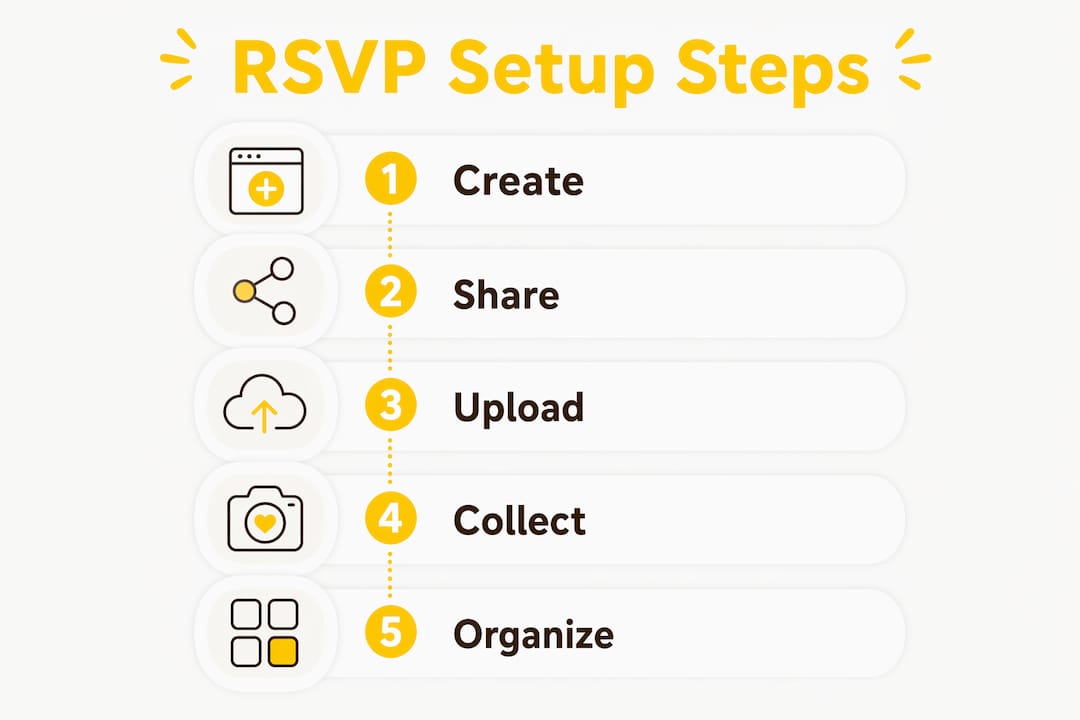
Follow these steps in order and your event will be ready well before invites go out.
Pro Tip: Print the QR code at a minimum of 3 cm × 3 cm and test it under the venue’s lighting conditions before the event. Poor contrast or a tiny print size is the most common reason guests fail to scan successfully.
Collecting photos and RSVPs means processing personal data. Under UK GDPR, you need a lawful basis for doing so.
For most private events, consent is the clearest basis. Include a tick box on your RSVP form that reads something like: “I agree to my photos being collected and stored in the event gallery for three months.” Keep a record of that consent alongside the guest response.
A simple privacy notice for your RSVP form should cover: what data you collect (name, email, dietary info, photos/videos), why you collect it (event management and shared gallery), how long you keep it (three months for media, or state your own retention period), how guests can request deletion (your contact email), and who processes the data on your behalf (SnapPix as a data processor).
SnapPix’s default hosting window is three months. If you need media beyond that, check the platform’s extension options and update your privacy notice accordingly. For high-resolution downloads, confirm you have exported and stored files securely before the hosting window closes.
The UK Information Commissioner’s Office (ICO) publishes clear guidance on photography and consent at events. Reviewing it before your event takes about 15 minutes and covers the most common edge cases.
Pro Tip: Keep consent simple and browser-native. A single tick box on the RSVP form, with a plain-English sentence explaining what guests are agreeing to, satisfies the requirement for most private events and takes guests under five seconds to complete.
Under UK GDPR, the host is the data controller and the platform is the data processor. That means the responsibility for informing guests and recording consent sits with you, not the platform.
This article is general information, not legal advice. Confirm your specific obligations with the ICO or a qualified data protection professional.
SnapPix is the right choice for most weddings, parties, and mid-sized corporate events. There are scenarios, though, where a different setup works better.
| Approach | Best for | Trade-offs |
|---|---|---|
| Lightweight RSVP forms | Small gatherings under 50 guests, no media needed | No photo collection, limited customisation |
| Photo-first RSVP platform (SnapPix) | Weddings, parties, corporate events up to several hundred guests | Not designed for badge printing or multi-session conference agendas |
| Enterprise event management | Large conferences, ticketed public events, multi-session programmes | Higher cost, subscription model, photo collection rarely included |
For large conferences that need badge printing, abstract submission, or multi-track session management, a platform like RSVPify or a dedicated conference system handles those workflows more naturally. You can still use SnapPix alongside it for the social photo collection element.
When you are running a B2B event and need RSVP data to flow directly into Salesforce or HubSpot, native CRM integration becomes the deciding factor. In that case, evaluate whether a Zapier connection from SnapPix meets your needs or whether you need a platform with a built-in bidirectional sync.
Pro Tip: If you are combining tools, keep the guest journey simple. One QR code for photos, one link for RSVPs. Two separate links on a printed card is fine; three or more creates confusion on the day.
SnapPix is the strongest pick for event hosts who need RSVP forms and guest photo collection in a single no-app workflow, with a flat per-event fee from £14.99 and a three-month hosting window.
| Point | Details |
|---|---|
| Best pick for photo-first RSVP | SnapPix combines QR uploads, RSVP forms, and AI albums in one no-app workflow. |
| Run the pre-event test | Scan the QR from a guest phone and upload a test photo before sending invites. |
| Check GDPR before launch | Add a consent tick box to your RSVP form and note the three-month media retention period. |
| Match tool to event scale | Enterprise conferences with badge printing need a dedicated system; SnapPix suits weddings to mid-sized corporate events. |
| Pricing signal | SnapPix charges a one-off per-event fee from £14.99 with no subscription required. |
Most event hosts focus on getting RSVPs confirmed and then scramble for photos afterwards. The two tasks feel separate, but they do not have to be.
The insight that shapes this recommendation is straightforward: the moment you add a mandatory app download to the photo collection process, you lose a meaningful share of your guests before they upload anything. Browser-based QR capture removes that barrier entirely. Guests who would never install a dedicated app will happily scan a code and upload three photos in 90 seconds.
The same logic applies to RSVPs. No-account, no-login flows consistently outperform forms that require guests to register. The best RSVP apps and sites share one trait: they ask as little of the guest as possible while giving the host as much data as they need.
Where SnapPix has a genuine limit is at the enterprise end: large conferences with badge printing, abstract submission, or complex multi-session agendas need a purpose-built conference platform. For everything from a 30-person birthday dinner to a 300-guest wedding or a corporate product launch, the integrated photo-first approach delivers something a standard RSVP tool simply cannot: a complete, curated gallery that builds itself while guests are still at the venue.
Most RSVP tools leave you chasing photos after the event. SnapPix collects both at the same time, with no app for guests and no subscription for you.

Guests scan a QR code, upload photos and videos straight from their phone browser, and your gallery fills up in real time. The RSVP form builder handles meal choices, plus-ones, and custom questions. AI smart albums sort everything automatically. The whole setup takes under 30 minutes, and the gallery stays live for three months after your event.
Pricing starts from £14.99 per event as a one-off fee with no ongoing subscription. Check the full pricing and hosting details to find the right option for your event size. Ready to see how it works? Start your event on SnapPix and have your RSVP and photo gallery live before your invites go out.

Event hosts' practical guide to posed and candid photos: perception research, hands on shooting tips, and no app guest uploads to boost candid coverage.

Which event technologies are production ready for 2026 and how to adopt them with clear consent, governance, and a no app QR photo pilot.

Which routes keep EXIF or strip GPS? Quick checks to view or remove metadata, plus a three month workflow to collect guest photos.