Event guest list: how to plan, manage, and track attendees
SnapPix TeamPublished 19 Jul 202620 min read

An event guest list is the foundational document that determines who attends your event, how you communicate with them, and how you manage their experience from invitation through to the day itself. Known in professional event planning as an attendee management record, a well-built guest list does far more than store names. It guides your catering numbers, shapes your seating plan, and tells you whether your invitation strategy is working. Get it right, and your event runs smoothly. Get it wrong, and you spend the final week chasing RSVPs and guessing headcounts.
The first step is setting your capacity and budget before you write a single name. Your venue holds a fixed number of people, and your catering budget has a ceiling. Both of these constraints define your list before sentiment does. Write those numbers down and treat them as rules, not guidelines.
Once you have your limits, build your list in tiers. Professional event planners use a three-tier model:
Timing your invitations by tier matters more than most planners realise. B-list invitations should go out at least 2–4 weeks before the event, with 4–6 weeks preferred, so guests do not feel like a last-minute choice. Sending too late signals that they were not your first thought, which damages goodwill.
One area that causes real friction is category-based decisions. Deciding to invite no colleagues at all, or only siblings and not cousins, is far easier to defend than cutting individuals one by one. Categorical rules make difficult cuts feel fair and remove the personal sting from omissions. Set these rules early and apply them consistently.

Pro Tip: Write your category rules down before you start building the list. Once names are on paper, it becomes much harder to apply rules objectively.
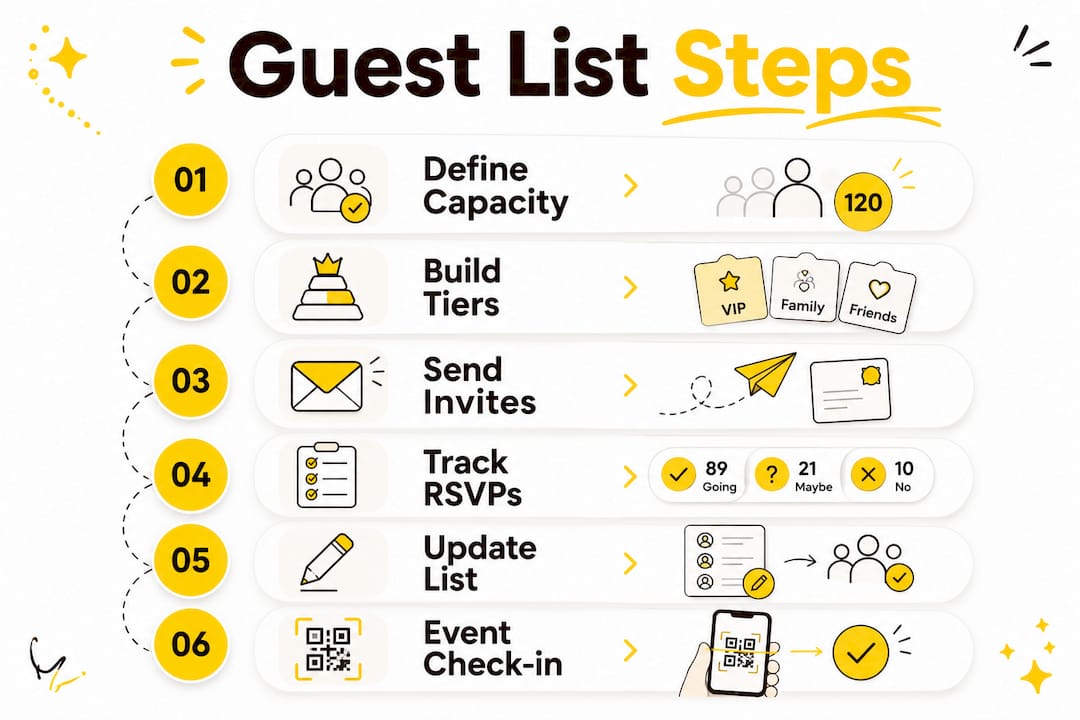
Digital RSVP systems change the speed and quality of the data you collect. Guests complete digital RSVPs in under 10 seconds, compared to the days or weeks it can take to chase paper responses. That speed means you get reliable headcount data earlier, which gives you more time to finalise catering and seating.
The real advantage of a digital system is the depth of information it captures alongside a simple yes or no:
GDPR compliance is not optional when you collect personal data through digital forms. Any platform you use to manage your event invite list must store data securely, limit access to authorised team members, and allow guests to request deletion of their information. Check this before you choose a platform.
Pro Tip: Connect your digital guest list to your event check-in system. When a guest arrives, your team can update their status in real time, which keeps your headcount accurate throughout the event.
A guest list tracker is a living document, not a spreadsheet you fill in once and forget. Regularly updated trackers prevent confusion and give you reliable final attendance data when you need it most. The key is knowing which fields to track and when to review them.
These are the core columns your tracker needs:
| Column | What to record |
|---|---|
| Guest name | Full name, including plus-one names |
| Invitation status | Sent, not yet sent, or resent |
| RSVP status | Attending, declined, or no response |
| Plus-one details | Name and any specific requirements |
| Meal choice | Dietary preference or menu selection |
| Seating assignment | Table number or zone |
| Notes | VIP status, accessibility needs, or special requests |
Schedule three formal checkpoints to audit your tracker:
Handling non-responses is one of the most frustrating parts of guest list management. Set a clear deadline in your invitation, and state that no response by that date will be treated as a decline. This gives you a clean cut-off and removes the guesswork from your final numbers.
A strategic guest list moves through distinct stages: target list, invited list, RSVP responses, registration, and attendance. Each stage tells you something different about how your invitation strategy is performing. If your RSVP rate is low, your follow-up process needs attention. If your attendance rate is low despite high RSVPs, your event communication needs work.
Your guest list data is more useful than most planners realise. Segmenting guests by their role or value to the event lets you send targeted messages rather than generic reminders, which reduces fatigue and improves response rates.
Practical ways to use your data well include:
Encouraging guests to participate actively during the event also starts with your guest list. When you know who is attending, you can plan photo challenges, interactive activities, and personalised touches that make guests feel genuinely welcomed rather than just counted.
A well-managed event guest list is the single most important planning tool for achieving accurate attendance, smooth logistics, and a positive guest experience.
| Point | Details |
|---|---|
| Build in tiers | Divide guests into must-invite, would love to include, and B-list to manage capacity fairly. |
| Time your invitations | Send B-list invitations 4–6 weeks before the event to preserve goodwill. |
| Use a living tracker | Update your tracker at three scheduled checkpoints to keep headcount data reliable. |
| Collect rich RSVP data | Capture dietary needs, plus-one names, and VIP status at the RSVP stage. |
| Segment for better outcomes | Group guests by role to personalise communication and support event goals. |
I have worked with event planners at every level, from first-time wedding hosts to experienced corporate event managers, and the pattern is consistent. Most people treat the guest list as an admin task to get through rather than a planning tool to use actively. That mindset costs them time, money, and guest goodwill.
The biggest mistake I see is building the list once and then leaving it alone. A guest list for any event with more than 30 attendees needs to be a centralised, real-time digital dashboard, not a static spreadsheet saved to one person’s laptop. When your team cannot see live updates, check-in slows down, dietary data goes missing, and last-minute additions cause chaos.
The second mistake is skipping segmentation. Sending the same message to your VIP table and your general guests is a missed opportunity. It takes 20 minutes to split your list into two or three groups and write slightly different messages for each. The guests who receive a personalised note notice it, and that detail shapes how they feel about the entire event.
My honest advice: treat your guest list as a communication strategy, not a headcount. Every field you track, every checkpoint you schedule, and every follow-up you send is a decision about how your guests experience your event. The planners who get this right consistently run better events, not because they have bigger budgets, but because they use the data they already have.
— Liam
Planning your guest list carefully means you know exactly who will be in the room. Snap-pix helps you make the most of that knowledge by collecting photos and videos from every one of those guests, without anyone needing to download an app.

Guests simply scan a QR code to upload their photos instantly, and Snap-pix organises everything into AI-curated albums you can access for three months after the event. With over 4,200 guest photos already collected across weddings and corporate gatherings, it is a practical way to preserve the candid moments your photographer will miss. Visit the Snap-pix features page to see the full gallery, photo challenge, and guest book tools, or read how it works to get started.
An event guest list is the master document that records every invited attendee, their RSVP status, and key details such as dietary requirements and seating assignments. It guides invitation management and event logistics from planning through to the day itself.
Start by setting your venue capacity and budget, then build your list in three tiers: must-invite guests, those you would love to include, and a B-list for when space allows. Apply category rules early to make difficult cuts fair and consistent.
A reliable tracker needs columns for guest name, invitation status, RSVP status, plus-one details, meal choice, seating assignment, and any special notes. Keeping it updated at scheduled checkpoints gives you accurate data when you need it most.
Send B-list invitations at least 2–4 weeks before the event, with 4–6 weeks preferred. Sending earlier gives guests enough notice and avoids the impression that they were a last-minute addition.
Your guest list is the full record of everyone invited. Your RSVP list is the subset of those guests who have confirmed their attendance. Managing both stages separately lets you track invitation performance and adjust your follow-up strategy accordingly.

Event hosts' practical guide to posed and candid photos: perception research, hands on shooting tips, and no app guest uploads to boost candid coverage.

Which event technologies are production ready for 2026 and how to adopt them with clear consent, governance, and a no app QR photo pilot.

Which routes keep EXIF or strip GPS? Quick checks to view or remove metadata, plus a three month workflow to collect guest photos.