SmugMug alternatives for UK weddings and events
SnapPix TeamPublished 4 Aug 202623 min read

For UK event organisers who need guests to share photos without downloading an app, SnapPix is the clearest choice. It uses a single QR code to open a browser-based upload page, works on any phone, and keeps the gallery private and password-protected throughout. Guests scan, upload, and move on, with no account required.
Here is why it stands out:
SmugMug and similar photographer-focused platforms are built for portfolio hosting and print sales, not for collecting candid shots from 120 wedding guests on a Saturday night. The friction starts immediately.
Shared cloud folders, whether Google Drive or iCloud, require guests to log in to an account they may not have or may not remember the password for. Public hashtags on social media strip photo quality through compression and make every image visible to anyone. WhatsApp group chats fill up fast, compress files, and leave the organiser manually saving hundreds of images one by one.
The core problems with these approaches:
A no-app, QR-code gallery removes every one of those barriers. Guests open a link in their phone browser and upload directly. No install, no sign-in, no confusion.
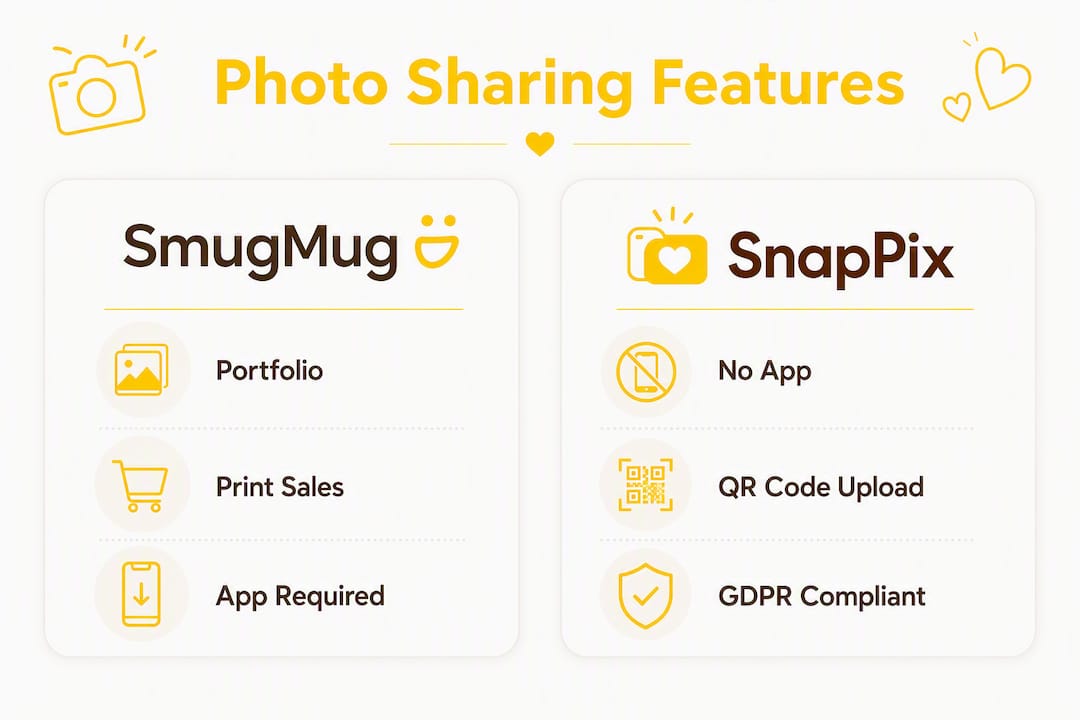
Use this checklist when comparing any event photo service. If a platform cannot meet the first three criteria, it is not built for events.
Non-negotiable features:
Useful additions:
UK-specific checks:
SnapPix ticks every item on that list. Guests scan the QR code, open the upload page in their browser, and contribute photos or videos without creating an account. The gallery stays open for three months after the event, giving guests time to upload photos they took on a proper camera or found later in their camera roll.
Key features at a glance:
“We used SnapPix at our own wedding and collected thousands of guest photos. The QR codes on every table meant guests were uploading from the moment they sat down. Post-event, downloading everything took one click.” — Liam, SnapPix founder (full case study)
For UK organisers, SnapPix’s deletion policy and GDPR-aware data handling mean you stay on the right side of ICO guidance without needing a legal background to understand the terms.
The setup takes minutes. Here is the sequence:
On the night, the two biggest participation drivers are visible QR codes and a live mention from the host. Guests who hear “scan the code on your table to share your photos” are far more likely to act than those who only see a small sign.
Pro Tip: Test the QR upload flow on both an iPhone and an Android device before the event. Check that the browser opens automatically after scanning and that camera permissions are granted. Fix any issues at home, not on the night.

Passive signage alone rarely drives strong upload numbers. The tactics below build momentum throughout the event.
Pro Tip: Add a short line to your event programme or order of service: “Scan the QR code on your table to share your photos with us.” Guests who read it before the event starts are primed to participate.
UK GDPR applies whenever you collect photos of identifiable people. As the event organiser, you are the data controller. The platform you use is the processor.
Before you book any service, confirm:
SnapPix publishes a clear deletion policy covering retention periods and how guests can request removal of their images. For large events with attendees from multiple countries, include a brief consent line in the upload flow stating where photos are hosted and how long they are kept.
Pro Tip: Add a short privacy note to your event page or invitation: “Photos you upload will be stored for three months and are only visible to invited guests. Contact [your name] to request deletion.” This reduces hesitation among privacy-conscious guests and improves overall upload rates.
Most dedicated event photo platforms use one of two pricing shapes: a one-time flat fee per event, or a monthly subscription. For a single wedding or party, the flat-fee model is almost always better value.
A typical one-time fee covers:
After the upload window closes, some platforms charge for extended hosting. SnapPix offers an optional annual extension so you can keep the gallery accessible without committing to it upfront.
Watch for these hidden costs:
The three-month upload window matters more than it sounds. Guests who were travelling, or who shot on a dedicated camera, often upload days or weeks after the event. A platform that closes uploads after 48 hours will miss a significant portion of the photos.
| Checklist dimension | SnapPix |
|---|---|
| No-app uploads for guests | Meets — browser-based, no install required |
| QR code support | Meets — print-ready QR generated in dashboard |
| Privacy and password protection | Meets — password-protected galleries as standard |
| Upload window length | Meets — three months post-event, extendable |
| Guest participation tools | Meets — photo challenges, prompts, guest book |
| AI albums and auto-organisation | Meets — groups by face, time, or theme |
| High-res exports and bulk download | Meets — one-click export, original file sizes preserved |
| Pricing model | Meets — one-time flat fee per event |
| UK support and GDPR alignment | Meets — deletion policy published, UK-focused |
For a small wedding (under 80 guests), the QR-on-every-table approach with one MC mention typically delivers strong participation. For a large corporate event, AI album rules and batch moderation save hours of post-event curation. For a graduation, the three-month window gives students time to upload photos taken on proper cameras after the day.
For UK event organisers, the right photo-sharing platform removes friction for guests and gives you full control over privacy, quality, and downloads.
| Point | Details |
|---|---|
| No-app uploads are non-negotiable | Guests will not install an app at an event; browser-based QR upload removes the main barrier. |
| QR placement and MC mention drive participation | Multiple visible codes plus a live host mention are the two biggest on-the-night participation drivers. |
| Check retention and deletion policies | UK GDPR requires you to know how long photos are stored and how guests can request removal. |
| Flat-fee pricing suits single events | A one-time fee avoids subscription costs for organisers who run one or two events per year. |
| SnapPix covers the full checklist | No-app QR uploads, AI albums, photo challenges, password protection, and a three-month window in one platform. |
When SnapPix was used at the founder’s own wedding, the result was thousands of guest photos collected across the day. The QR codes placed on every table meant guests were uploading from the moment they sat down for the meal, not just during the formal photography moments.
The single most useful lesson from that event: signage placement at the bar outperformed table cards for volume. Guests waiting for a drink had a natural moment to scan and upload. If you can only place QR codes in two locations, the bar and the entrance are the two that work hardest.
Read the full Liam and Megan wedding case study for the complete breakdown of what worked, what the guests said, and how the post-event download went.
Collecting guest photos should not require a spreadsheet of WhatsApp messages or a plea email two weeks after the event. SnapPix gives you a private, password-protected gallery that guests open in their browser, upload to in seconds, and leave without creating an account.

One QR code. Three months to collect. One-click download in full resolution. No subscriptions, no per-guest fees, no compression. For UK weddings, parties, graduations, and corporate events, it is the most practical setup available. See how SnapPix works and create your event gallery today.

Secure sponsor access to event photos with a host controlled workflow. Use time limited QR links, view only tokens, instant revocation, and access logs.

A practical host first workflow: collect no app QR uploads, keep moderation and professional curation, set retention and backup plans so you stay in control.

Event hosts' practical guide to posed and candid photos: perception research, hands on shooting tips, and no app guest uploads to boost candid coverage.