RSVP wording examples: 40+ ready templates for hosts and QR galleries
SnapPix TeamPublished 2 Sept 202643 min read

This article gives you copy-ready RSVP wording for cards, wedding websites and QR codes, organised by tone and situation. You’ll find exact phrasing for reply-by dates, plus-ones, meal choices and online RSVPs, plus a bank of over forty templates ready to adapt. Jump to whichever section matches your invitation style.
TL;DR:
- Clear response-by dates of three to four weeks before the wedding are essential for timely final headcounts, especially for catering purposes.
- Keep RSVP wording consistent with the event’s formality, using simple accept or decline options and avoiding ambiguous labels or vague deadlines.
- Online RSVP links and QR codes should be prominently placed on details cards or signs, with clear instructions and confirmation messages to minimize follow-up questions.
- For events with meal choices, specify options with abbreviations and move detailed selections to online forms if space on printed cards is limited.
- When inviting families or managing plus-ones, specify whether children are included and direct the guest count explicitly to avoid confusion.
If you need a line in the next two minutes, start here. These are the phrases that show up most often on well-designed invitations, and each one does the job without confusing your guests.
Reply-by phrasing:
Accept/decline options, formal:
Accept/decline options, casual:
Online RSVP lines:
Plus-one and headcount:
Each of these works as a standalone line or as the anchor for a longer template. The rest of this guide shows you how to build on them.
Every RSVP, whether printed or digital, needs three non-negotiable elements: a reply-by date, a line for the guest’s name, and an unambiguous way to say yes or no. Miss any one of these and you’ll spend weeks chasing replies by text.
The name line is where most confusion starts. Traditional stationery uses a single “’M” followed by a blank line, prompting guests to write their own honorific (Mr, Mrs, Dr, Ms) before their name. It’s elegant but not always intuitive, and Zola’s guide to RSVP cards notes that swapping it for a plain “Name(s):” is entirely acceptable on casual or modern cards. Use whichever fits your invitation suite, but pick one and be consistent across every card you send.
Beyond the essentials, Shutterfly’s wedding RSVP wording guide recommends a short list of optional fields depending on your reception format:
Space is the real constraint on printed cards. A standard RSVP card runs 3.5 by 5 inches, which leaves room for perhaps four short fields before it looks cluttered. If you need more than that, either abbreviate (initials for meal choice, a tick box instead of a written line) or move the extra fields to an online form linked by QR code. Digital RSVPs don’t have this problem at all, since a web form can expand to as many fields as you need without cramping anyone’s handwriting.
Your RSVP wording should match the formality of your invitation, but the underlying job never changes: a guest needs to see a date, and choose clearly between attending or not. Here’s how that plays out across five common styles.
Formal and classic. Traditional wording leans on set phrases that have barely changed in decades. According to Paperlust’s RSVP wording guide, the standard formula reads: “The favour of a reply is requested by the fourteenth of March,” followed by “Accepts with pleasure” and “Declines with regrets” as tick-box or fill-in options. Pair this with the “M” name line for full etiquette correctness. It suits black-tie weddings, cathedral ceremonies, and any invitation printed in engraved or letterpress type.
Modern and warm. This is the most popular register for contemporary weddings: polished but not stiff. Try “We can’t wait to celebrate with you! Kindly let us know by [Date]” followed by two clear tick boxes: “Joyfully accepts” and “Regretfully declines.” It keeps the personality of a modern invitation suite while never leaving a guest unsure how to respond.
Casual and relaxed. For backyard weddings, brunches, or anything without a formal dress code, drop the flourishes entirely. “RSVP by [Date] so we can plan the cake” or “Let us know by [Date] if you’re in!” works well, paired with simple yes/no boxes: “Count me in” / “Can’t make it, but sending love.” The tone matches the event; the structure underneath is identical to a formal card.
Funny and playful. Humour works on RSVP cards as long as the accept/decline choice stays crystal clear underneath the joke. A line like “We’re tying the knot and we need to know if you’ll be there to watch us fumble the vows” is charming, but always follow it with plain tick boxes rather than a joke-only response option. Cute doesn’t excuse ambiguity. If a guest has to guess which box means “yes,” the joke has cost you a headcount.
Destination and themed weddings. These often need extra logistical detail woven into the RSVP itself, since guests are usually deciding on travel at the same time as attendance. Something like “Join us in Tuscany! Please RSVP by [Date] so we can finalise travel arrangements for our group” does double duty, confirming attendance while flagging that travel planning is time-sensitive. For adults-only events, add a direct line such as “This will be an adults-only celebration; we hope you understand” printed on the invitation itself rather than the RSVP card, so guests know the rule before they even reach the reply.
Whichever tone you pick, resist the urge to get too clever with the accept/decline labels. Stationery designers and planners generally advise keeping the actual yes/no options plain, and saving personality for the heading or the envelope liner instead.
Digital RSVPs have overtaken mailed cards for a simple reason: they give hosts real-time counts and let guests fix mistakes without a phone call. Digital RSVP wording data shows this shift is largely about ease of updating meal or dietary choices after the fact, something a paper card can never do once it’s posted back to you.
The wording itself needs to be shorter than card copy, because a QR code or web link lives in a small corner of an invitation. Effective lines include:
Placement matters as much as wording. Put the QR code or web address on the details card rather than the main invitation, where it won’t compete visually with the ceremony information. If you’re combining RSVP collection with guest photo sharing, a well-worded QR sign at the reception can point guests to both in one scan; SnapPix’s guide to QR code sign wording covers short, scannable phrasing that works for either purpose.
Once a guest responds, a brief confirmation message closes the loop and cuts down on “did that even go through?” texts. Something like “Thanks! Your RSVP is received. To make changes, contact [email] or revisit this link before [Date]” reassures guests their reply landed, and gives them a clear route to fix a meal choice later. That single sentence saves you dozens of follow-up messages in the final fortnight before the wedding.
Meal-choice wording only belongs on your RSVP if you’re actually serving a plated dinner with more than one entrée. Buffets, family-style service and cocktail receptions don’t need it at all, so don’t add a field just because it looks thorough.
When you do need it, card space dictates the format. On a printed card with room for one line per guest, Wedding Planner Toolkit’s guidance on meal wording recommends short abbreviations with a printed key: “C” for chicken, “S” for salmon, “V” for vegetarian, listed once at the bottom of the card so guests aren’t guessing what the letters mean.
For households with multiple guests, give each person their own line rather than one shared choice:
If a printed card genuinely can’t fit per-guest meal fields without looking cramped, move meal selection to an online form instead and keep the printed card to a simple attendance line with a QR code pointing guests to the fuller digital form. That split, simple card and detailed website, tends to produce cleaner data than trying to cram five fields onto a card built for two.
Ambiguous plus-one wording is one of the fastest ways to end up with guests you never invited turning up on the day. The fix starts before the RSVP card is even printed: how you address the envelope determines whether a plus-one is on offer at all.
The Knot’s wording guidance recommends stating reserved seats explicitly when capacity is limited: “We have reserved 2 seats in your honour” leaves no room for a guest to assume they can bring a friend. This works better than an open “Number of guests attending” field, which invites guests to fill in whatever number they like.
Where a plus-one genuinely is included, name it directly rather than leaving a blank count field:
For family invitations, decide upfront whether children are included and state it plainly rather than hoping guests infer it from the envelope. “We can’t wait to celebrate with your whole family!” signals children are welcome; “We’re having an adults-only celebration and hope you’ll join us for a night off” does the opposite without sounding apologetic.
Set your reply-by date three to four weeks before the wedding, not one. Paperlust’s planning research points out that caterers typically need final headcounts around two weeks out, so a three to four week buffer leaves you time to chase stragglers without panicking the week of the wedding.
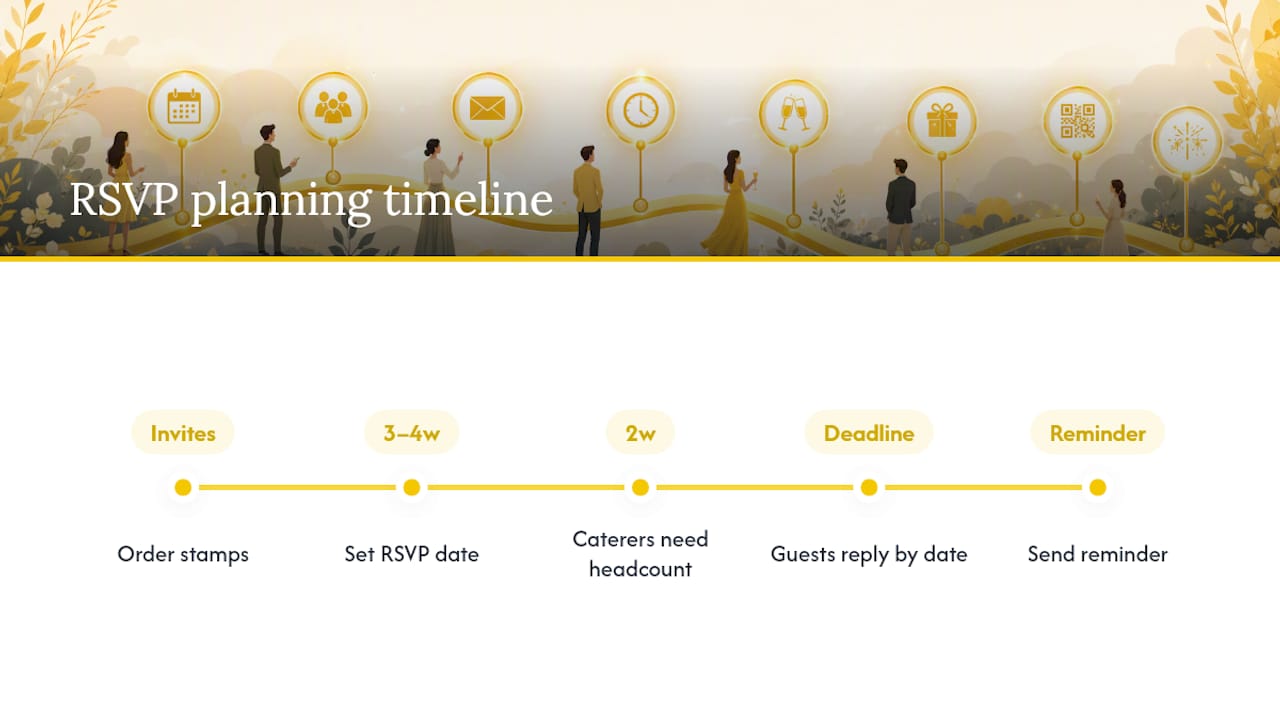
Always use a specific calendar date rather than vague language. “RSVP by 21 March 2026” gives a guest a concrete deadline to work towards; “RSVP soon” or “Please respond ASAP” gives them nothing to plan around, and Jotform’s research into invitation wording flags this as one of the most common causes of slow replies.
A short reminder template for stragglers a few days after your deadline: “Just a friendly nudge, we haven’t heard back yet and would love to know if you can join us. Could you reply by [new date]?”
Pro Tip: If you’re using mail-back RSVP cards, order stamps for the return envelopes before you post the invitations, not after. A card that arrives without prepaid postage sits on a kitchen counter for weeks, and that delay eats straight into the three to four week buffer you built in.
Pick the category that matches your invitation and adapt the date, names and venue details.
Formal and classic
Modern and warm
Casual and relaxed
Funny and playful
Destination and themed
Online and QR-specific copy
Meal-choice examples
Limited-guest wording
Family and children wording
Regrets-only wording
Reminder and follow-up wording
The fastest way to slow your responses down is vague language. “RSVP soon” or “reply ASAP” gives guests nothing concrete to act on, and Jotform’s wedding invitation research identifies this as a frequent, avoidable cause of late replies.
Watch for these pitfalls:
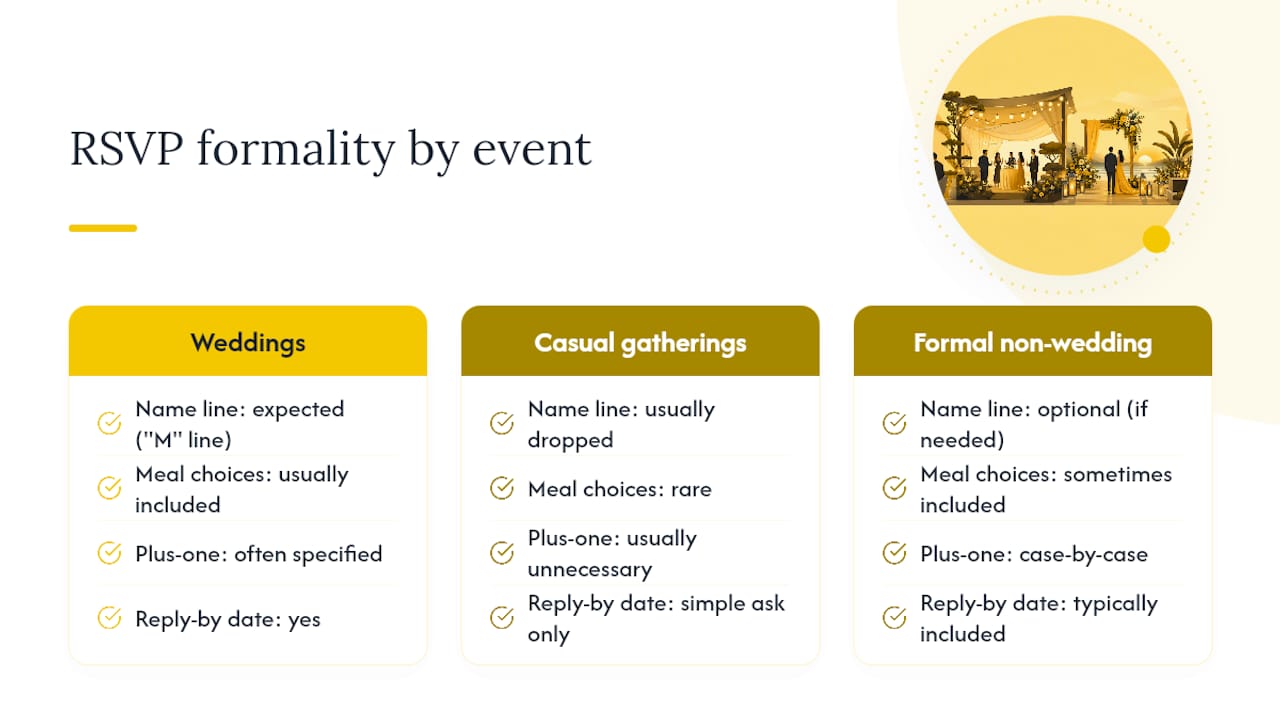
Wedding RSVP wording carries more etiquette weight than most other event types, largely because it usually involves a formal name line, a meal choice, and often a plus-one decision all at once. That combination is why the “M” line and phrases like “Accepts with pleasure” have survived so long: they handle three etiquette questions in two short phrases.
Birthday parties and casual gatherings can drop almost all of that formality. A simple “Let us know by [Date] if you’re coming!” does the job, since there’s rarely a plated meal or a plus-one policy to navigate. Formal non-wedding invitations, milestone anniversaries, black-tie fundraisers, and the like, sit somewhere in between: they usually keep a reply-by date and a clear accept/decline line, but can drop the guest name-line formality if the invitation itself already lists intended recipients.
The rule that carries across every event type is proportionality. Match the formality of your RSVP wording to the formality of the event itself, not to what looks impressive on the card. A backyard barbecue with an engraved, gilt-edged RSVP card reads as strange to guests, just as a black-tie gala with “Count us in!” undersells the occasion. Consistency between invitation and RSVP tone is itself a form of etiquette, and it’s one that’s easy to get right once you’ve picked your overall style.
A reply-by date and a name line solve half the problem. The other half is making sure a confused guest has somewhere to turn, and that means listing contact information in a way that’s genuinely easy to spot, not buried in small print at the bottom of a card.
For printed cards, a single line beneath the RSVP instructions works best: “Questions? Call [Name] at [phone number] or email [email address].” Pick one point of contact rather than listing two people, since split contact details tend to create confusion about who’s actually managing the guest list. If you’re using an online form, place a “Need help?” link or line near the submit button rather than only in a footer, since that’s where a stuck guest is looking when they give up.
Format matters too: write phone numbers with consistent spacing (“07123 456789” rather than “07 1 2 3…”), and use an email address you actually check daily during the RSVP window, not one you set up for the wedding and forgot about. If a guest calls and it goes to voicemail every time, you’ll get a text or a DM instead, and that reply won’t necessarily make it into your official headcount.
Virtual and hybrid weddings need one extra layer of clarity that in-person events don’t: guests must confirm not just whether they’re attending, but how. A simple accept/decline box no longer covers it.
Effective phrasing separates the two questions cleanly: “Will you join us in person or via livestream? In person ___ Livestream ___ Unable to attend ___” This works on both printed cards and online forms, and it stops the awkward situation where a guest RSVP “yes” without specifying which version of the day they mean.
For the livestream itself, give guests the access details only after they’ve confirmed, rather than printing a public streaming link on the invitation. A confirmation message covers this neatly: “Thanks for your RSVP! Your livestream link and password will be emailed to you the week of the wedding.” That keeps the stream private to invited guests and gives you a natural moment to remind remote attendees of the time zone and start time, both easy to get wrong when a wedding spans different countries.
Family invitations go wrong most often when the RSVP card leaves the children question unanswered until a guest is already filling it in. Settle it earlier, on the invitation itself, so the RSVP card only needs to collect names and meal details.
If children are welcome, it is helpful to provide a space to list the names and ages of all family members attending to assist with accurate planning. This also helps with catering, since children’s meals are often priced or portioned differently from adult meals, and a caterer will ask for that split closer to the big day.
If the event is adults-only, state it kindly and directly on the invitation rather than hoping the RSVP card implies it: “We’re having an adults-only celebration and hope you’ll join us for a night off.” Follow this with a plain “Number of adults attending: ___” field on the RSVP itself, since by that point the age question has already been settled and the card doesn’t need to repeat it.
Clear QR and website phrasing doesn’t just speed up your headcount, it trains guests to scan confidently later in the day too. Once someone has successfully used a QR code to RSVP, they’re far more comfortable scanning a second one at the reception to upload photos.
That’s the logic behind pairing RSVP wording with guest-photo collection from the start. SnapPix has seen this play out across weddings where hosts set up their QR gallery for guest photos alongside their RSVP link: no app to download, three months of upload access after the big day, and AI-driven smart albums that sort the results automatically. Guests on those events have already contributed over 4,200 photos through the platform, and clear, low-friction wording is a big part of why they bothered scanning at all.
— Liam
SnapPix is the option for hosts who want their RSVP and their photo collection working from the same setup, rather than juggling a paper card, a separate wedding website, and a photo-sharing app guests have to download. Every event on SnapPix comes with a custom RSVP form builder alongside the QR gallery, so the same code you print on your details card can handle both jobs.

Guests scan once, RSVP in seconds, and later use that same familiarity to upload their own photos and videos straight from their camera roll, no app required. Galleries stay open for three months after the wedding, and AI-driven smart albums sort the results while photo challenges nudge guests to capture moments you’d otherwise miss entirely. With over 4,200 guest photos already collected across events using the platform, it’s a proven way to combine your RSVP wording with a gallery that actually fills up. Take a look at the full SnapPix features page and set up your event’s RSVP and photo QR code together before your invitations go to print.

Secure sponsor access to event photos with a host controlled workflow. Use time limited QR links, view only tokens, instant revocation, and access logs.

A practical host first workflow: collect no app QR uploads, keep moderation and professional curation, set retention and backup plans so you stay in control.

Event hosts' practical guide to posed and candid photos: perception research, hands on shooting tips, and no app guest uploads to boost candid coverage.