Set Up Corporate Event Photo Sharing in Minutes, No App, Private
SnapPix TeamPublished 13 Sept 202630 min read

The fastest way to gather and share guest photos at a corporate event is a no-app QR or link gallery that delivers private, branded results in real time. Guests scan a code, upload straight from their phone’s browser, and organisers get a curated gallery within minutes rather than days. SnapPix is built around exactly this approach, which is what makes it worth understanding before you book anything for your next event.
TL;DR:
- No-app QR and link galleries allow guests to upload photos directly from their phones without downloads, enabling real-time, branded collections that appear within minutes.
- Organisers should verify limits on maximum upload size, gallery availability after the event, and whether full-resolution images can be downloaded to ensure it meets event needs.
- Access controls should include password protection or guest-list gating, and clear policies on data retention, deletion, and cookie disclosures must be confirmed before usage.
- The gallery setup should be completed days in advance, with testing on multiple devices, proper QR code placement, and staff briefings to prevent technical issues during the event.
- Using live photo walls, challenges, and brand-integrated signage can significantly increase guest participation and enhance sponsor visibility during the event.
A guest arrives, scans a code on a table stand or screen, and lands on a browser page. No app store, no download, no login wall. They upload straight from their camera roll or shoot directly through the browser, and the photo appears in the shared gallery within seconds.
That simplicity hides a fair bit of engineering underneath. Mobile browsers handle camera access and file uploads differently across iOS and Android, so a gallery has to compress images sensibly without destroying quality, strip or manage metadata (location tags matter for privacy), and queue uploads when Wi-Fi drops out mid-conference.
Two upload streams typically run at once at a corporate event:
Feeding both into one gallery is what makes a live event photo sharing slideshow work on the big screen behind the stage. AI-driven album sorting can group images by time, location, or detected content automatically, saving someone from scrolling through hundreds of near-duplicates after the fact.
Before you commit to any platform, check three practical limits: the maximum file size per upload (video files especially can hit a ceiling fast), how long the gallery stays open for new uploads after the event ends, and whether guests can download full-resolution originals or only compressed previews. These details rarely make it onto a sales page, but they decide whether your gallery actually works on the day.
Corporate galleries carry more risk than a wedding album. Employees, clients, and sometimes press are in the frame, and HR or legal teams increasingly expect a clear answer on where those images live and who can see them.
Start with access control. A public link is fine for a product launch you want shared widely, but most internal events need something tighter: a password-protected gallery, a token-based link sent only to the guest list, or gating uploads to people who scan a code physically present at the venue. Ask your vendor which of these options exist before you assume the default setting suits your event.
Run through this before signing off on any gallery:
That last point matters more than most organisers realise. Vendors handling any kind of session tracking should publish clear disclosures, in the way Microsoft Clarity’s privacy documentation does for its own analytics tools, and hosting providers should be transparent about cookie use, as Cloudflare’s developer policies set out for media delivery. Ask your vendor for the equivalent.
Consent capture is often the weakest link. A simple form embedded before upload, similar in principle to a basic Google Forms consent flow, gives guests a chance to agree to sharing terms before their photo lands in a public-facing gallery.
Pro Tip: Put your retention policy on the signage itself, not just in a terms-of-service link nobody reads. A line like “Photos stay live for three months, then are removed” reassures cautious guests far more than a QR code alone.
For a fuller walkthrough of these safeguards, secure event photo sharing guidance covers the mechanics in more depth.
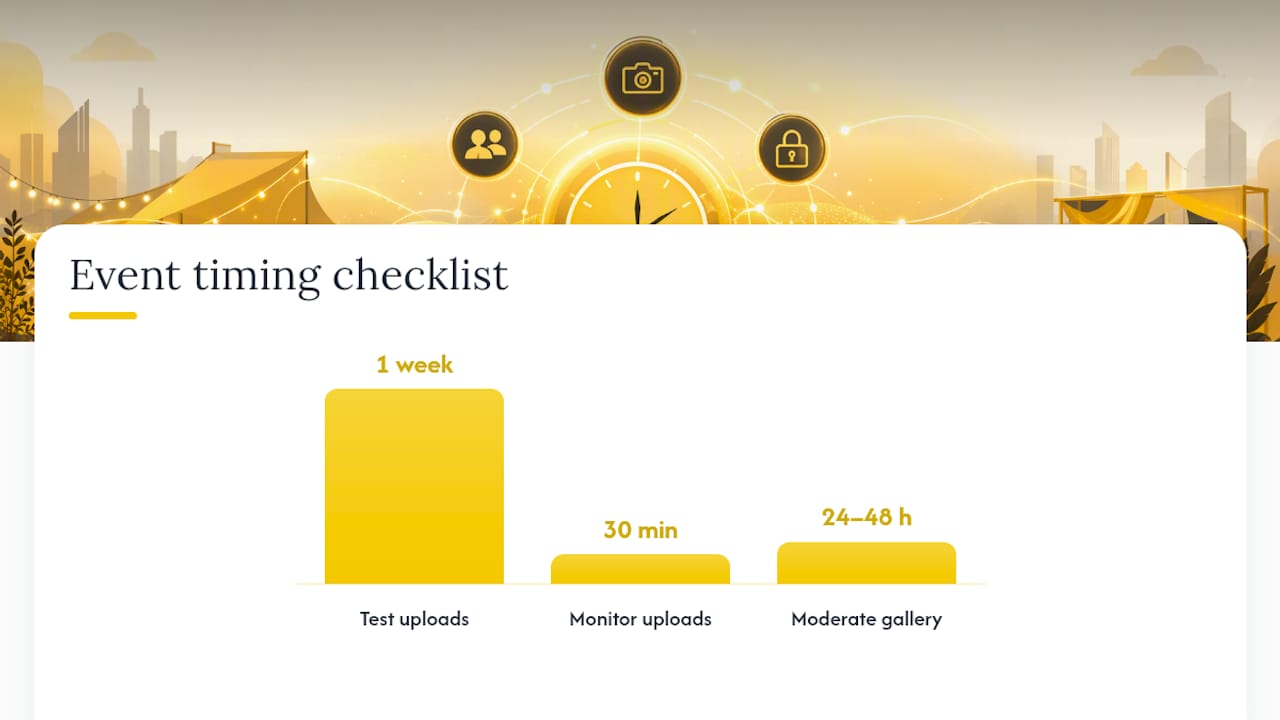
A gallery that runs smoothly on the night was almost always set up properly days before. Here’s the sequence that avoids the usual scramble.
Pre-event:
On the day:
Post-event:
The most common pitfall is treating the QR code as “set and forget.” Codes get covered by drinks glasses, printed too small to scan from a distance, or placed where lighting makes them unreadable on a phone camera. A quick walk-through of the venue with your own phone, checking each code from a realistic guest angle, catches most of this before doors open. For the mechanics of code placement and sizing, SnapPix’s QR upload guide is a useful reference.
Uploads don’t happen automatically just because a QR code exists. Getting genuine participation from a room full of employees or clients takes a bit of nudging, and a few tactics consistently outperform simply hoping people remember to upload.
A live photo wall on a big screen, refreshing every few seconds with new arrivals, does more to drive uploads than any amount of signage. Guests upload once, see themselves on screen, and often go straight back for a second photo. Photo challenges push this further: prompt guests to capture “your favourite moment from the keynote” or “you and someone new,” and participation climbs because there’s a specific thing to do rather than a vague invitation to “share your photos.”
Branding matters as much as the technical setup here. Sponsors who fund a networking event want to see their logo attached to the memories people actually share afterwards, and a gallery that looks generic undersells that investment. A tool such as SnapPix’s AI smart albums can automatically sort challenge submissions into their own category, so sponsor-branded prompts stay easy to find later.
Pro Tip: Pre-write your signage copy before the event, not on the day. “Scan to see yourself on screen” consistently outperforms “Scan to upload photos” because it promises an immediate, visible reward.
For inspiration on branded experiences at retreats and off-sites, Luana Inn’s approach to special events shows how sponsor placement and atmosphere work together outside a purely digital gallery.
Most event photo platforms price around a flat per-event fee rather than a recurring subscription, which suits a one-off corporate function far better than a monthly contract you’d need to cancel afterwards. Some vendors layer on feature tiers, charging extra for white-labelled branding, longer hosting windows, or unlimited storage beyond a base allowance.
The main cost drivers worth budgeting for:
Before signing, ask for a written data deletion clause, confirmation of who can access admin logs, and a plain answer on what happens to your data if you don’t renew hosting. Compare that against the DIY alternative, a shared drive or group chat, and the value gap becomes obvious fast: no branding, no moderation, no guarantee anyone actually contributes.
SnapPix was built around the exact problem most corporate organisers run into: guests want to share photos, but nobody wants to install another app for a one-off event. The platform gives every guest a QR code that opens straight to a browser upload page, with no account creation required.
Beyond the basic upload flow, a few features matter specifically for corporate use:
The no-app model can encourage guest photo uploads, providing an alternative to traditional app-based solutions. Before booking, confirm your retention period, branding options, and export rights directly with the platform so expectations match what your event needs.
Most no-app gallery platforms don’t build native, deep integrations into tools like Slack or a corporate email platform, and it’s worth setting that expectation early. What they typically offer instead is a shareable gallery link that drops cleanly into any channel your organisation already uses.
That’s usually enough. A gallery link pasted into a Slack channel, an internal newsletter, or a follow-up email works identically to a link pasted anywhere else. The gallery itself doesn’t need to “know” about Slack for your team to share it there five minutes after the event ends.
Where this gets more useful is on the distribution side. If your comms team wants to push highlights automatically across multiple channels, pairing your gallery export with a social copy tool can save real time. A generator like AmmarAI’s social media post tool can turn one strong event photo into platform-specific captions for LinkedIn, an internal Slack update, and an email newsletter blurb, without someone rewriting the same message three times by hand.
The practical takeaway: don’t hold out for a gallery platform with a native Slack app. Focus instead on how easily the platform lets you export a clean, shareable link or high-resolution asset, since that link is what actually moves through your existing communication channels. For guidance on getting photos into a shareable, exportable state quickly after the event, organising event photos into a workflow covers the export step in more detail.
Guest uploads excel at candid, social moments: the laughter during a team dinner, the genuine reaction to an award announcement. They’re weaker for anything that needs consistency, like executive headshots or press-ready shots of a keynote stage. Hire a professional for those specific moments and let guest uploads fill in everywhere else.
The simplest operational rule: if the image needs to go in front of a journalist, a shareholder, or a sponsor’s marketing team, get a professional behind the camera. If it’s going into an internal recap or a “great time was had by all” LinkedIn post, guest photos usually tell a better, more human story anyway. Running both into the same gallery, with clear folder or tag separation, avoids the scramble to find which shot came from which source when the deadline hits.
— Liam
SnapPix removes the single biggest friction point in corporate event photo sharing: nobody has to download anything to take part. Guests scan a code, upload straight from their phone, and your gallery fills up in real time, complete with your branding, sponsor placements, and AI-sorted albums ready for comms to use the next morning.

The upload window typically gives your team enough time to pull assets for newsletters, recap decks, or follow-up social media posts without rushing Photo challenges keep participation high through the slower parts of a conference day, and password-protected access keeps sensitive internal events off the public web. If you’re planning an event and want a gallery that’s ready before doors open, take a look at the full feature list and set up your first gallery today.
The best option is one built around no-app QR or link uploads with private, branded galleries and a clear retention policy. SnapPix follows this model, combining browser-based uploads with AI smart albums and a three-month access window.
Combine a hired photographer for formal moments, such as keynotes and headshots, with guest-uploaded photos for candid social coverage throughout the day. Running both into one shared gallery captures a fuller picture than either source alone.
A password-protected or token-gated gallery link, branded with your company’s logo and hosted for a fixed period, reads far more professionally than a shared drive folder or a group email thread. It also gives you control over who can view or download the images.
A short window of a few months is standard industry practice, long enough for comms teams to pull assets without paying for indefinite storage. Some platforms keep QR code access live for a limited period post-event, often measured in months.
No. A no-app gallery lets guests scan a QR code and upload directly through their phone’s browser, with no account or installation required.

Event hosts' practical guide to posed and candid photos: perception research, hands on shooting tips, and no app guest uploads to boost candid coverage.

Which event technologies are production ready for 2026 and how to adopt them with clear consent, governance, and a no app QR photo pilot.

Which routes keep EXIF or strip GPS? Quick checks to view or remove metadata, plus a three month workflow to collect guest photos.